

When it comes to building a successful website, SEO (Search Engine Optimisation) is crucial.
With WordPress being one of the most popular content management systems globally, it’s essential to understand how to leverage SEO best practices to improve your site’s visibility.
Whether you’re a beginner or a seasoned website owner, this guide will walk you through the ultimate steps to optimise your WordPress website for search engines and achieve higher rankings.
Understanding SEO for WordPress
SEO is the practice of making changes to your website and its content to help it rank higher on search engine results pages (SERPs).
When you optimise your site for SEO, you make it easier for search engines like Google to crawl and index your website, which can lead to better rankings and more traffic.
WordPress, by default, is relatively SEO-friendly. However, there’s still plenty of work you need to do to get the most out of it.
From selecting the right plugins to crafting optimised content, this guide covers everything you need to know.
Why SEO Matters for WordPress Websites
SEO is essential for driving organic traffic to your website. For WordPress users, SEO helps ensure that search engines can find your site, understand its content, and display it to the right audience.
With sound SEO implementation, your WordPress site can see increased visibility, credibility, and visitor engagement—all of which can lead to more leads, conversions, and business success.
Without good SEO, even the most beautifully designed website might remain invisible on the web, leaving your target audience unaware of your presence.

WordPress SEO Basics
Before diving into the more advanced tactics, it’s important to lay a strong foundation with the basics of WordPress SEO.
1. Choose a Good Hosting Provider
The speed and performance of your WordPress site can greatly affect your SEO.
Google considers page speed when ranking websites, and slow loading times can result in a poor user experience.
Choosing a reliable hosting provider that offers fast servers and excellent uptime is the first step in boosting your WordPress SEO.
Some WordPress hosting providers, like 20i, SiteGround, Bluehost, or WP Engine, offer specialised hosting solutions for optimising website performance.
A hosting provider should deliver high-performance, secure, and scalable hosting solutions tailored to meet the needs of businesses and individuals.
Their hosting plans are designed to accommodate a variety of platforms, including WordPress, eCommerce, and custom web applications.
Offering features such as SSL certificates, daily backups, and easy scalability, a hosting company needs to stand out as a dependable partner for web hosting, allowing your business to grow without worrying about your online infrastructure.
Are you fed up with constant issues from your current hosting provider? Tired of contacting support and waiting forever for problems to be resolved? If the answer is yes, it’s time to make a change! At Digital Transformation Consultancy (DTC), we offer reliable, fast, and secure hosting services tailored to your business needs.
With responsive support and high-performance hosting, we ensure your website runs smoothly without the headaches. Contact us today and experience hassle-free hosting that truly delivers.
2. Install an SEO Plugin
One of the advantages of WordPress is the availability of plugins to enhance functionality. For SEO, the most popular plugins are Yoast SEO and Rank Math.
These plugins offer a wide range of tools and features to help you optimise your website, from adding meta titles and descriptions to creating XML sitemaps.
3. Set Your Permalinks Structure
Permalinks are the URLs of your posts and pages. WordPress offers several different permalink structures, but the best for SEO is the “Post name” structure. This ensures that your URLs are clean, short, and descriptive, helping both search engines and users understand the content.
To set this, go to your WordPress dashboard, click on Settings, then Permalinks, and choose the “Post name” option.
Keyword Research for WordPress SEO
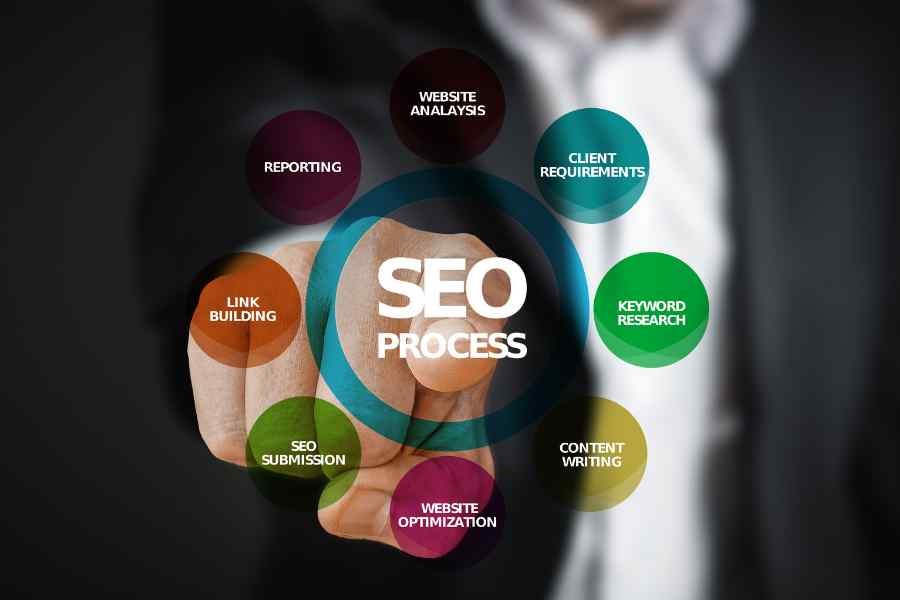
The foundation of any successful SEO strategy is keyword research. Keywords are the terms and phrases your target audience types into search engines when looking for information. Identifying and incorporating the right keywords into your content helps Google rank your site for relevant searches.
1. Use Keyword Research Tools
To find the best keywords for your WordPress site, use tools like Google Keyword Planner, SEMrush, or Ahrefs. These tools provide valuable insights into what people are searching for in your niche, including search volume, competition, and keyword difficulty.
2. Focus on Long-Tail Keywords
While broad keywords can drive a lot of traffic, they’re often highly competitive. Focusing on long-tail keywords—specific phrases that typically consist of three or more words—can help you target a more relevant audience and increase your chances of ranking higher.
3. Place Keywords Strategically
Once you’ve identified your target keywords, incorporate them naturally throughout your site. This includes placing them in:
- Meta titles and descriptions
- Headings and subheadings (H1, H2, H3 tags)
- The first paragraph of your content
- The URL of your page or post
- Image alt text
However, avoid keyword stuffing, which can result in penalties from Google. Focus on creating valuable content that provides a great user experience.
On-Page SEO for WordPress

On-page SEO refers to the optimisation of the content and structure of your website to improve its search engine rankings.
Here are the most important aspects to focus on:
1. Craft Optimised Meta Titles and Descriptions
Meta titles and descriptions play a crucial role in how search engines and users view your website. They appear in the SERPs and influence click-through rates.
Your meta title should be concise and include your primary keyword, while the meta description should offer a brief, compelling summary of the page content, also incorporating your target keywords. Both should be under the character limits—typically 60 characters for titles and 160 characters for descriptions.
2. Use Proper Heading Tags
Headings help structure your content, making it easier for readers to scan and search engines to understand. Always use only one H1 tag per page (usually for the main title) and use H2, H3, etc., for subheadings.
3. Optimise Your Images
Images can enhance the user experience, but they need to be optimised to avoid slowing down your site. Use the Alt Text field to describe the image using keywords. This helps search engines index your images and improves accessibility for visually impaired users. You should also compress images to reduce file size, helping with faster loading times.
4. Internal and External Linking
Linking to other pages on your website (internal linking) helps search engines understand the structure of your site and keeps visitors engaged longer. You should also include links to reputable external sources (external linking) to provide additional value to your readers.
Technical SEO for WordPress
Technical SEO refers to optimising the technical aspects of your website to improve its crawling and indexing by search engines.
1. XML Sitemaps
An XML sitemap is a file that helps search engines navigate and index your website. SEO plugins like Yoast SEO automatically generate an XML sitemap for your WordPress site, which you can submit to Google Search Console.
2. Use a Mobile-Friendly Theme
More than half of web traffic comes from mobile devices, and Google now uses mobile-first indexing. Ensure your WordPress theme is mobile-friendly, meaning it automatically adjusts to fit the screen size of mobile users.
3. Implement SSL
Google gives a ranking boost to sites that are secure, meaning they use SSL (Secure Socket Layer) certificates. SSL encrypts data between your website and its users, providing an added layer of security. You can implement SSL on your WordPress site by installing an SSL certificate through your hosting provider.
Schema Markup for WordPress
Schema markup helps search engines understand the content of your site more effectively, which can result in rich snippets (additional information displayed in the SERPs). You can use plugins like Schema Pro to implement schema markup on WordPress easily.
Best Practices for WordPress SEO
- Regularly update your content to keep it relevant.
- Remove unnecessary plugins and optimise your database to improve site speed.
- Monitor your website’s performance using tools like Google Analytics and Search Console.
Content Creation for WordPress
High-quality content creation is essential for any website blog, driving engagement, improving SEO rankings, and establishing authority within your industry.
Well-crafted content not only captivates your audience but also ensures your website stays fresh and relevant.
At Digital Transformation Consultancy (DTC), we offer a full content creation service tailored to meet your unique business needs. Whether you’re looking for SEO-focused blog posts, captivating social media content, or engaging copy for digital marketing campaigns, we’ve got you covered.
DTC produces content for all platforms, including websites, social media, and email marketing, all while working within your budget.
Our team ensures your message is clear, compelling, and designed to drive results, helping your business grow.
FAQs About WordPress SEO

1. Do I need coding knowledge to optimise my WordPress site for SEO?
No, with plugins like Yoast SEO or Rank Math, most SEO tasks can be done without any coding knowledge.
2. How often should I update my SEO strategies?
SEO is constantly evolving, so it’s essential to review your strategies every few months and stay up-to-date with algorithm changes.
3. How long does it take to see SEO results?
SEO is a long-term investment, and it may take several months to see significant changes in rankings and traffic.
4. Can WordPress themes affect SEO?
Yes, the right theme can improve site speed, mobile responsiveness, and user experience, all of which impact SEO.
5. What is the best SEO plugin for WordPress?
Both Yoast SEO and Rank Math are highly recommended and offer a range of features to help you optimise your site.
6. Should I use categories and tags?
Yes, using categories and tags can improve site organisation and user experience, but avoid overuse to prevent duplication issues.
7. Can I switch SEO plugins?
Yes, but make sure to transfer your settings properly to avoid losing SEO data during the transition.
8. Is blogging important for SEO?
Yes, regular blogging helps keep your site active, provides fresh content, and targets new keywords for additional traffic opportunities.
By following the steps outlined in this guide, you’ll be well on your way to mastering SEO for your WordPress site and driving meaningful traffic that converts into customers.